

Top 10 Instagram Reel AI Prompts for Men’s Dynamic and Engaging Short Video Content
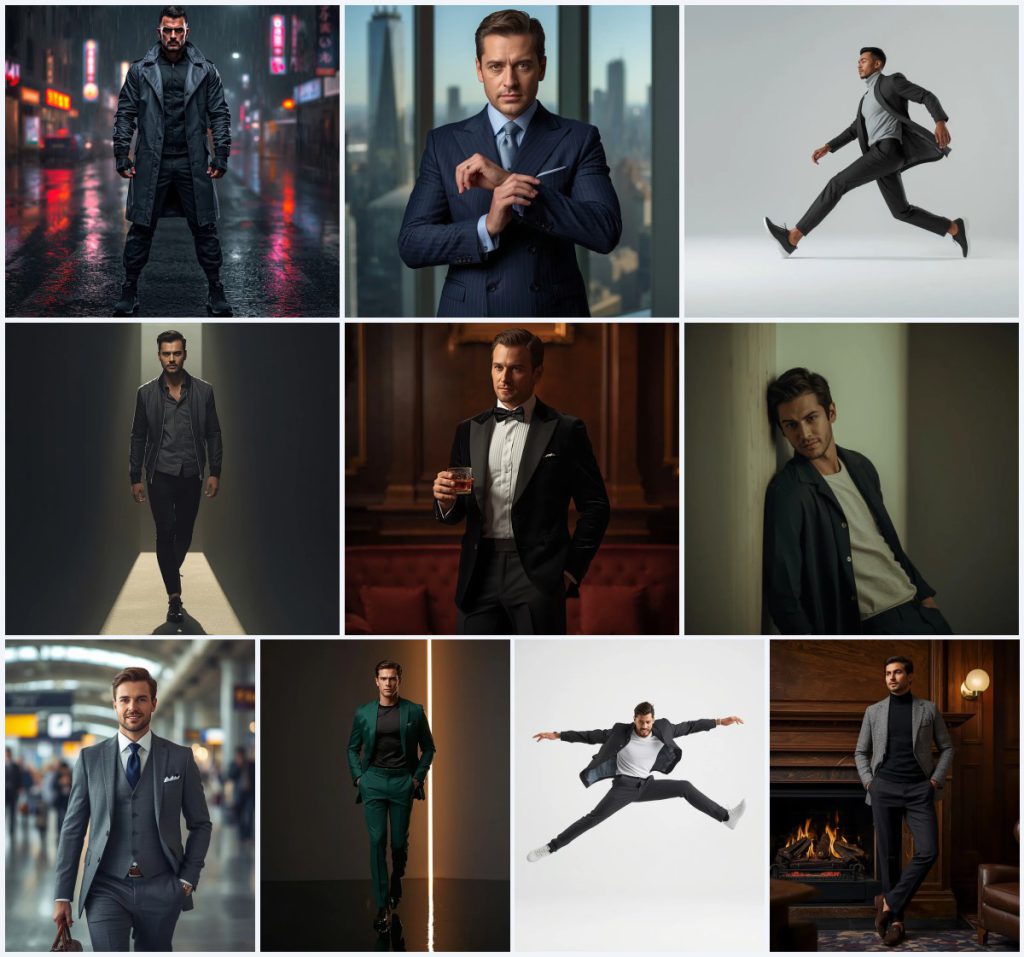
This collection brings together ten AI image prompts designed for men's dynamic and engaging short video content on Instagram Reels. Each prompt focuses on a different aspect of masculine style and presence, from a powerful man in monochromatic techwear on a rainy urban street to a sophisticated man in a velvet dinner jacket in a dimly lit lounge. The prompts are crafted to produce ultra-realistic, high-resolution images that can serve as striking visuals for reels, thumbnails, or editorial posts.
Whether you are creating a cyberpunk-inspired editorial or a classic business portrait, these prompts offer a range of scenes and moods. They emphasize full-body poses, detailed outfits, and cinematic lighting to capture attention quickly in a fast-scrolling feed. By following the guidance in this article, you can adapt these prompts to your own reference photos and generate images that feel both polished and authentic.
What these men's Reel prompts are asking for
These prompts are built around full-body shots of men in specific outfits and settings, each designed to convey a distinct mood such as power, sophistication, or casual confidence. They include technical camera details like lens type, aperture, and resolution to guide the AI toward a realistic, editorial look. The collection covers a variety of styles, from streetwear to formal wear, ensuring there is something for different reel themes.
- A man in a waterproof trench coat, tactical trousers, and high-tech sneakers standing on a rainy urban street at night.
- A man adjusting his cufflink in a high-rise office with panoramic city views, wearing a double-breasted navy pinstripe suit.
- A modern man sliding one foot forward in a smooth motion, wearing a modern outfit with ultra-realistic skin texture.
- A stylish man walking through a beam of light, creating dramatic highlights and deep shadows across his body.
- A sophisticated man holding a glass of whiskey in a dimly lit lounge, wearing a black velvet dinner jacket and bow tie.
- A dapper man walking purposefully through a busy airport terminal in a tailored grey suit, carrying a leather briefcase.
Setting the scene for each prompt
The scenes in this collection range from moody urban environments to refined interiors. For example, the techwear prompt places the subject on a 'rainy urban street at night' with a 'blurred cityscape glistening with rain' and 'vibrant neon lights from storefronts and traffic.' This creates a futuristic, cyberpunk atmosphere. In contrast, the velvet dinner jacket prompt sets the man in a 'dimly lit, upscale lounge' with 'rich, dark wood paneling, plush seating, and subtle brass accents,' evoking timeless elegance and exclusivity.
Other prompts use minimal or high-key settings. The green suit prompt features a 'highly reflective dark floor' and a 'vertical beam of warm white light slicing through a dark gray void,' emphasizing contrast and the clean drape of the suit. The mid-jump prompt uses a 'pure white seamless background' with 'high-key lighting evenly illuminating subject,' focusing entirely on the dynamic motion and outfit flow. Each scene is carefully described to ensure the AI generates a cohesive and visually striking image.
Why these prompts work for Instagram Reels
These prompts are tailored for short-form video content because they prioritize visual impact and quick readability. The full-body poses and detailed outfits make the subject stand out even on a small screen, while the cinematic lighting and shallow depth of field add a professional, editorial feel that can stop scrollers. The variety of settings and moods allows creators to match the prompt to their reel's theme, whether it's fashion, lifestyle, or business.
- They produce ultra-realistic images with high dynamic range and sharp textures, which are essential for maintaining quality when compressed for Reels.
- The prompts include specific camera settings like 35mm lens and f/2.0, which guide the AI to create images with a natural, photographic look.
- The diverse range of scenes and outfits ensures there is a prompt for every type of men's fashion or lifestyle reel, from casual to formal.
Three styles you can achieve with this collection
This collection offers three distinct styles that you can mix and match depending on your reel's aesthetic. Each style is rooted in the prompt details, so you can maintain consistency across your content.
- Cyberpunk Streetwear: The techwear prompt uses a monochromatic outfit in dark grey and black, neon reflections, and a rainy urban night to create an edgy, futuristic look.
- Classic Business Elegance: The double-breasted pinstripe suit and airport terminal prompts emphasize tailored fits, professional settings, and soft natural or bright artificial lighting for a polished, authoritative vibe.
- High-Fashion Editorial: The green suit and mid-jump prompts feature minimal backgrounds, strong contrast, and dynamic poses to deliver a bold, magazine-ready aesthetic.
How to use these prompts step by step
Using these prompts is straightforward, but following a few steps can help you get the best results. Start by selecting the prompt that fits your reel concept, then adapt it with your own reference photo if needed.
- Copy the prompt. Choose one of the ten prompts and copy the full text exactly as provided, including all camera settings and descriptive details.
- Upload a reference. If you want the generated man to resemble you or a specific model, upload a clear reference photo with good lighting and a neutral expression.
- Generate the image. Paste the prompt into your chosen AI tool, attach the reference if used, and generate the image. You may need to run it a few times to get the desired result.
- Check hands. Inspect the hands carefully for any extra fingers, missing digits, or awkward poses, as AI often struggles with hands.
- Check face. Ensure the face looks natural and matches the intended expression, with realistic skin texture and no distortions.
- Check the main object. Verify that key items like the suit, briefcase, or glass of whiskey are rendered correctly and fit the scene without anomalies.
Choosing the right reference photo
A good reference photo can significantly improve the likeness and realism of your generated image. It should be clear, well-lit, and show the subject from a similar angle to the prompt's pose.
- Use a high-resolution photo where the face and body are clearly visible, avoiding blur or heavy shadows.
- Match the lighting of your reference to the prompt's scene when possible, or be prepared for the AI to adjust it.
- If the prompt requires a specific outfit, choose a reference photo where the subject is wearing something similar or plain clothing that won't conflict.
Tools you can use with these prompts
Different AI image generators handle these prompts with varying degrees of realism and control. Here is a comparison of four popular tools and how they might perform with a detail from this collection.
| Tool | Access | Typical realism | Useful here for |
|---|---|---|---|
| ChatGPT | Web, API | Moderate to high | Generating a man in a waterproof trench coat on a rainy street with neon reflections, though may need prompt tweaks. |
| Google Gemini | Web, API | High | Capturing the sophisticated man in a double-breasted navy pinstripe suit with sharp details in a high-rise office. |
| Leonardo AI | Web, app | High | Creating the stylish man walking through a beam of light with dramatic highlights and deep shadows. |
| Midjourney | Discord, web | Very high | Producing the velvet dinner jacket scene with rich textures and warm ambient lighting in a dimly lit lounge. |
Tips for better results with these prompts
To get the most out of these prompts, consider adjusting a few elements based on your specific needs. Small changes can make a big difference in the final image.
- If the techwear outfit looks too flat, add 'reflective materials' or 'wet surfaces' to enhance the neon reflections on the waterproof trench coat.
- For the velvet dinner jacket, specify 'soft warm ambient lighting' to bring out the sheen of the velvet and the brass accents in the lounge.
- When generating the mid-jump shot, emphasize 'frozen motion' and 'dynamic outfit flow' to ensure the pose looks energetic and natural.
Common issues and how to fix them
Even with detailed prompts, AI generators can produce unexpected results. Here are some common issues and what to adjust in your prompt or settings.
| Issue | What to change |
|---|---|
| Distorted hands or fingers | Add 'perfect hands' or 'detailed hands' to the prompt, or use a tool with hand correction features. |
| Face doesn't match reference | Increase the weight of the reference image if your tool allows, or use a lower denoising strength. |
| Outfit details are inaccurate | Specify fabric types and colors more precisely, e.g., 'black velvet dinner jacket with satin lapels'. |
| Background too busy or distracting | Add 'clean minimal background' or 'blurred background' to reduce clutter and focus on the subject. |
Frequently Asked Questions
Can I use these prompts for video content instead of still images?
Yes, you can generate a still image and then animate it using video editing tools, or use AI video generators that accept image prompts. The dynamic poses and lighting are designed to look good in motion.
Do I need a reference photo to use these prompts?
No, a reference photo is optional. Without one, the AI will create a random face. With a reference, you can achieve a specific likeness, but results may vary depending on the tool.
Which prompt is best for a professional business reel?
The double-breasted pinstripe suit and the dapper man in a grey suit prompts are ideal for business content, as they convey authority and sophistication in corporate settings.
Conclusion
These ten AI prompts offer a versatile toolkit for creating dynamic and engaging men's content for Instagram Reels. From cyberpunk streetwear to classic elegance, each prompt is designed to produce ultra-realistic images with cinematic quality. By following the step-by-step guide and using the tips provided, you can adapt these prompts to your own style and reference photos. Experiment with different tools and settings to find what works best for your creative vision.
Always ensure you have the right to edit and use any photo you upload as a reference before generating AI images.